Skin problems
Link each product to the skin problems it addresses, such as dryness, acne or redness. These links:
- Decide which skin problem chips the product appears under on the Products tab of the result page.
- Are used by recommendation rules based on skin scores.
A product that isn't linked to a skin problem is never recommended for it, even if it would be a good match.
Link a product to a skin problem
-
Open the product.
-
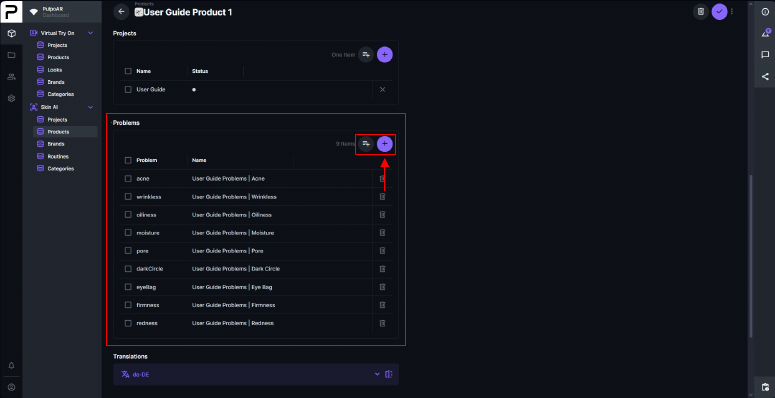
In the Problems table, click Add Existing to pick a skin problem, or + to create a new link.
-
Select the skin problem. A product can have several.

The links belong to the product in that project. For example, a hydrating serum can be linked to Dryness in one project, and to Dryness and Fine Lines in another.
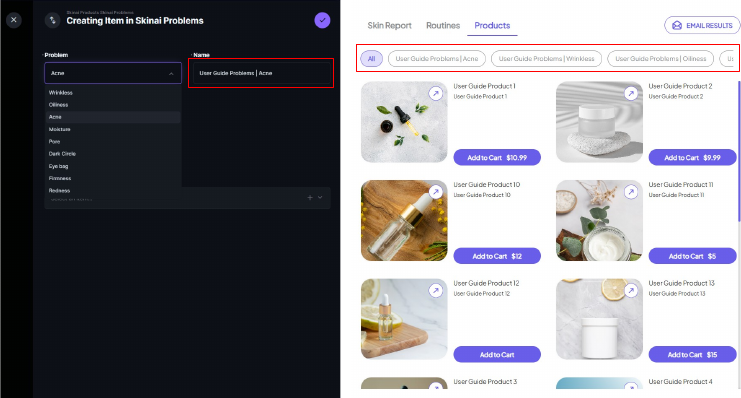
Change the chip name
When you create the link, you can enter a custom Name. It's shown on this product's chip on the Products tab of the result page.
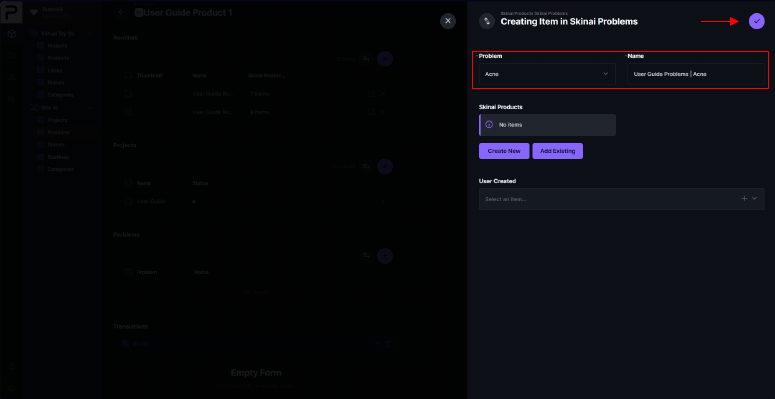
This name only changes this product's chip. To rename the skin concern cards on the Skin Report tab, use the Theme Designer.