Skin Analysis
Skin Analysis analyzes your customers' skin from a single photo and recommends products from your catalog. Customers:
- Take or upload a photo, and optionally answer a short questionnaire.
- Get a skin report with a score for each skin concern, such as dryness, oiliness, fine lines, redness or acne.
- See recommended products and routines based on their scores and answers.
- Preview a product's expected effect over time with the AI Simulator.
- Go to the product page, add products to their cart or email themselves the results.
You set up and manage everything in PulpoAR Studio, under Skin AI in the left menu.
Key terms
| Term | Meaning |
|---|---|
| Project | One Skin Analysis experience, for example one website or one market. It has its own catalog, questions, recommendations, design and analytics. |
| Product | A skincare product that can be recommended. |
| Skin problem | A skin concern the analysis scores, such as dryness or redness. Products are linked to the skin problems they address. |
| Routine | A named group of products shown in order, for example cleanse, tone, treat and moisturize. |
| AI Simulator | A preview of a product's expected effect on a skin concern, at up to three points in time. |
| Question Builder | The questionnaire customers answer. Answers can be used in recommendation rules. |
| Recommendations | Rules that decide which products and routines each customer sees, based on their answers and skin scores. |
Project tools
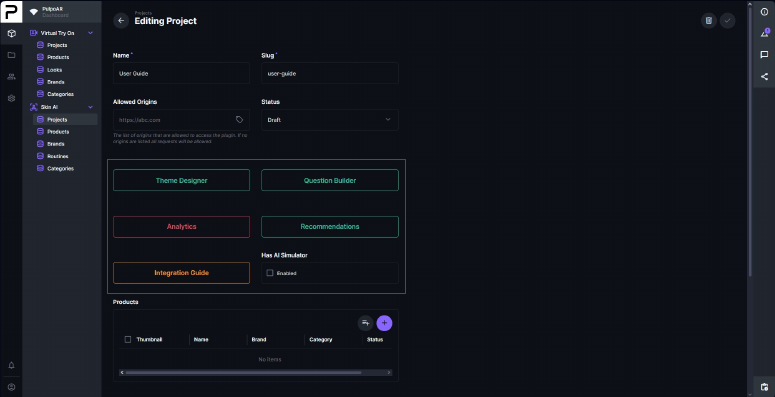
Each project page has these tools:
| Tool | What it's for |
|---|---|
| Theme Designer | Change colors, fonts and text to match your brand. |
| Question Builder | Build the questionnaire. |
| Recommendations | Set the rules for recommended products and routines. |
| Integration Guide | Embed code for your developers, with your project details filled in. |
| Analytics | Traffic and engagement once you're live. |
| Catalog Manager | Add and update your catalog and recommendations in bulk with Excel. |
| Has AI Simulator | Turns the AI Simulator on for the project. |
The Products and Routines tables at the bottom of the page list what's in the project.
Setting up a project
- Create a project.
- Add products, or import them in bulk.
- Link each product to skin problems.
- Optionally, create routines and set up the AI Simulator.
- Build the questionnaire.
- Set up recommendations.
- Customize the design.
- Send the integration link to your developers. They can follow the Developer Guide.
- Publish the project and track it in Analytics.