Projects
A project is one Hair Color Try-On experience. Create a separate project for each website, market or use case.
Hair Color and Makeup Virtual Try-On projects are separate. To offer both on the same website, create one project for each and embed them separately.
Create a project
- In Studio, go to Hair Color Try-On → Projects.
- Click + at the top right.
- Fill in the project fields (see below) and save.
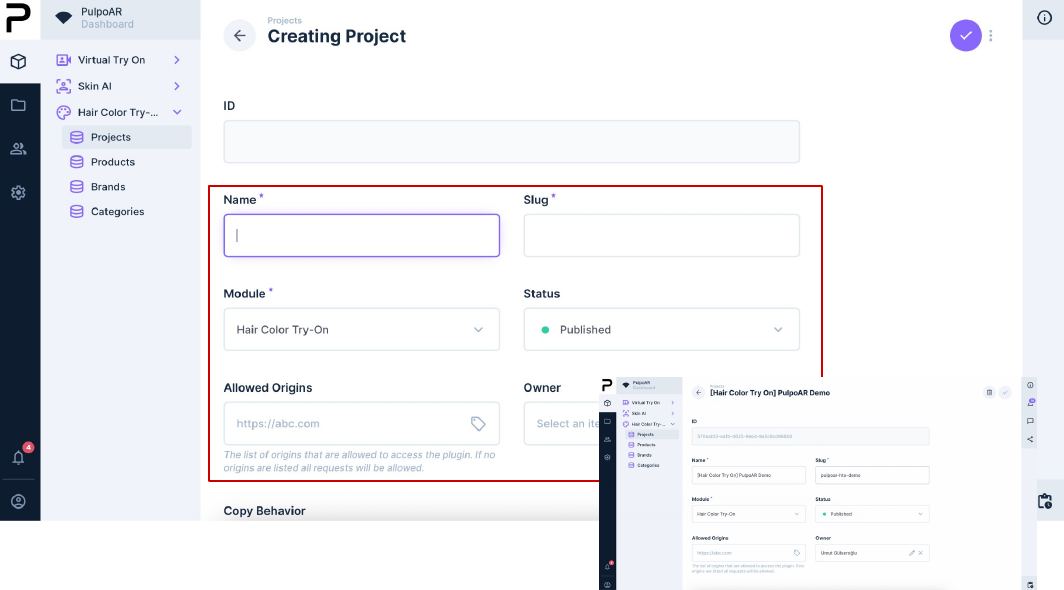
Project fields
| Field | Description |
|---|---|
| Name | Required. The name you see in Studio. |
| Slug | Required. A unique, lowercase, hyphenated identifier, for example brand-tr-hair. It appears in the integration link: https://plugin.pulpoar.com/hto/brand-tr-hair. |
| Module | Required. Set to Hair Color Try-On. |
| Status | Published makes the experience live. Draft turns it off without deleting anything. |
| Allowed Origins | The websites allowed to show the experience. If empty, it works on any website. |
| Owner | The business account that owns the project. |
Don't change the slug after launch
The slug is part of the integration link. Changing it breaks every website and app that uses the slug.
Tips
- Keep the project in Draft until it's set up and tested.
- Always set Allowed Origins before going live.