Users and roles
Give each team member their own Studio login, with only the access they need.
Roles
| Role | Access |
|---|---|
| Business Account | Your organization's main account. Owns all users and projects. |
| Partner Admin | Full access to assigned projects, including users and settings. |
| Partner Editor | Can edit content and the catalog in assigned projects. Can't manage users or settings. |
| Partner Viewer | Read-only access to assigned projects. |
Each user can be limited to specific projects. For example, if you run one project per country, each country team can see only its own project while your central team sees all of them.
Add a user
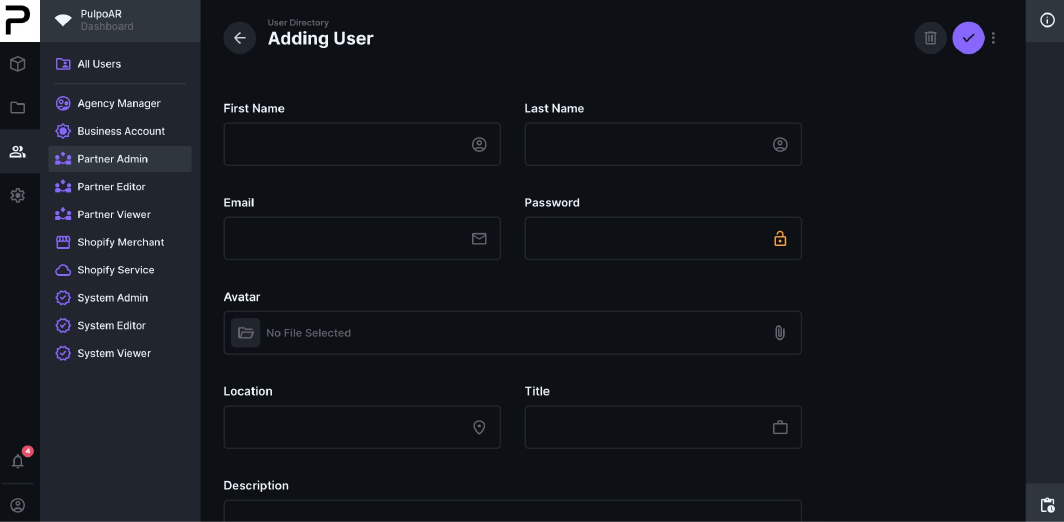
- Open the role the user should have, for example Partner Editor.
- Create a new user.
- Fill in First Name, Last Name, Email and Password. Avatar, location, title and description are optional.
- Click ✓ at the top right to save.
Remove a user
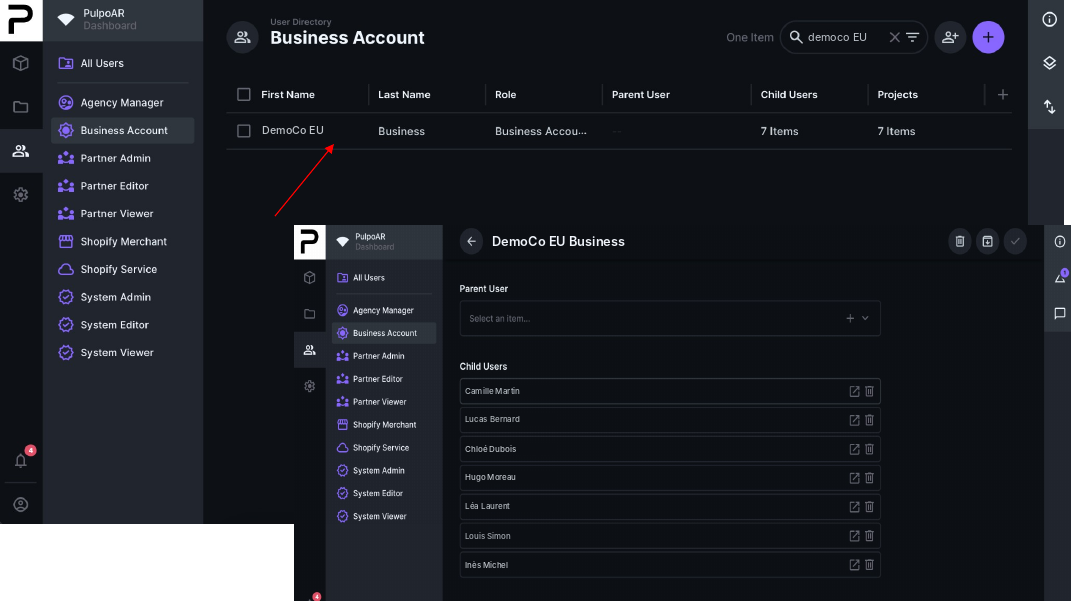
Open your Business Account. In Child Users, click the trash icon next to the user.
Tips
- Don't share logins. Give each person their own account.
- Use the most limited role that works. Editor or Viewer is enough for most people.
- Give agencies and partners their own accounts.
- Remove users when they leave the team or the project ends.